


Blink Charging Mobile App
3.81.88K Reviews
App Specs
- Version
- 3.1.39
- Updated On
- License
- Free
- Downloads
- 100,000+
- Developer
- Blink Charging
- Categories
- Auto & Vehicles
- Platform
- Android, iOS
Screenshots
 Analysis by AppCompare
If you're anything like me, always on the go and in need of reliable charging solutions for your electric vehicle, the Blink Charging Mobile App might just become your new best friend. I recently took the app for a spin, and I’m here to spill the beans on how it performs in the real world.
First Impressions
The first thing you’ll notice when you open the Blink Charging Mobile App is how slick the interface looks. It’s got that modern vibe without being too cluttered. Navigating through the menus feels intuitive, and even if you’re not the most tech-savvy person, you’ll find it easy to find your way around. The app is designed to cater to both iOS and Android users, making it accessible to a wide audience.
Features That Stand Out
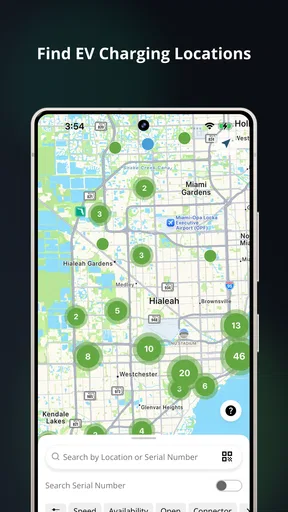
What really caught my attention were the nifty features packed into this app. First off, the real-time charger availability is a game-changer. You can see which stations are free, so no more driving around aimlessly hoping to find an open charger. Super handy, right?
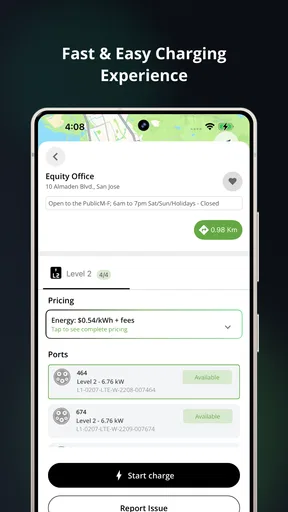
Another cool feature is the ability to start and stop charging sessions straight from the app. This means no more fumbling with cards or trying to remember passwords. Just a tap on your phone and you’re good to go. Plus, the app lets you monitor your charging session in real-time, so you know exactly when your vehicle is ready to hit the road again.
Ease of Use
For me, ease of use is crucial, and the app delivers on this front. Setting up an account is a breeze. Just pop in your details and you’re set. The app provides clear instructions, and if you ever get stuck, there’s a helpful FAQ section that guides you through common issues.
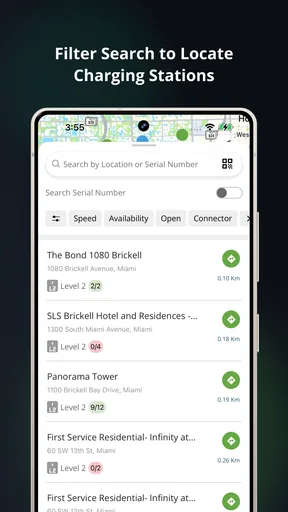
The search function is another highlight. Whether you’re looking for a fast charger or something nearby, the app’s powerful search filters help you find exactly what you need. You can filter by charger type, distance, and availability, making it super efficient to plan your stops.
Performance and Reliability
In terms of performance, the app runs smoothly without any noticeable lag. During my testing, I didn’t experience any crashes or bugs, which is always a good sign. The reliability is top-notch, and the app updates quickly to show the latest information on charger availability.
Worth Reading Before You Choose

EA SPORTS FC Mobile 26 Is a Bigger Football Game, but It Takes Time

Flipboard Shows What News Apps Must Do Beyond the Feed

Switching to Android Auto Means Rethinking Your Driving Routine

Google Calendar Makes a Crowded Week Easier to Manage

Ludo King Makes the Most of the Minutes Between Plans

Baby Panda World Brings Quick Play to Modern Phones, but Its Game Library Feels Busy
Additionally, the app sends notifications to keep you informed about your charging status and any issues, like if someone else unplugs your vehicle. It’s these little touches that make the app feel polished and user-friendly.
Ending Thoughts
After spending some quality time with the Blink Charging Mobile App, I can confidently say it’s a must-have for any electric vehicle owner. It not only simplifies the charging process but also enhances the overall experience with its user-friendly design and robust features. Whether you’re a seasoned EV driver or just starting, this app is sure to make your life a whole lot easier.
So, if you’re ready to take control of your charging needs and make your EV journey smoother, give this app a shot. Trust me, once you try it, you’ll wonder how you ever managed without it.
Pros
- User-friendly interface for easy navigation.
- Real-time updates on charging station availability.
- Secure payment options integrated within the app.
- Comprehensive map with filters for quick searches.
- Supports multiple languages for broader accessibility.
Cons
- Limited support for some older devices.
- Occasional app crashes reported by users.
- Requires stable internet for optimal performance.
- Some users find the registration process lengthy.
- Inaccurate location data for a few stations.
FAQs for Blink Charging Mobile App
What is the Blink Charging Mobile App used for?
The Blink Charging Mobile App is designed to help electric vehicle (EV) owners locate and access Blink charging stations across the country. It provides real-time information about station availability, charging status, and pricing. Users can also start and stop charging sessions directly from the app, making it a convenient tool for EV drivers.
How do I find a Blink charging station using the app?
Finding a Blink charging station is simple with the app's integrated map feature. Users can view a detailed map displaying all nearby Blink stations, along with information about each location. Filters allow users to search by connector type and station availability, ensuring you find the most suitable charging option for your vehicle.
Can I make payments through the Blink Charging Mobile App?
Yes, the Blink Charging Mobile App supports secure, in-app payments for charging sessions. Users can link a credit or debit card to their account, enabling seamless transactions. The app provides a detailed receipt for each session, allowing users to keep track of their spending and manage their charging expenses efficiently.
Does the Blink Charging Mobile App offer any rewards or benefits?
The app offers a rewards program for frequent users, allowing them to earn points for every charging session. These points can be redeemed for discounts or free charging sessions. This loyalty program is designed to encourage regular use and provide added value to EV drivers who rely on Blink's network.
Is the Blink Charging Mobile App compatible with all electric vehicles?
The Blink Charging Mobile App is compatible with most electric vehicles. It provides information and access to stations with various connector types, ensuring a wide range of EV models can utilize the service. Users should verify their vehicle's compatibility with specific Blink stations via the app to ensure a seamless charging experience.


